Link in Bio

    Best Linktree Alternative for Selling Digital Products in 2026

    Linktree is great for links, but it can't sell products, offers zero SEO, and puts your social accounts at risk. Here's why thousands of creators are switching to Creastor.

    14 min readUpdated

    Why Linktree Falls Short for Creators Who Sell

    Linktree pioneered the "link in bio" concept back in 2016. For years, it was the default choice for anyone who needed more than one link in their Instagram or TikTok bio. But here's the reality in 2026: Linktree is a link aggregator, not a selling platform — and for creators who monetize their audience, that distinction costs real money.

    If you're sending followers to a Linktree page that just lists links to external sites, every extra click is a potential lost sale. More friction, more drop-offs, lower conversions. The average e-commerce site loses 68% of shoppers during checkout — and Linktree adds even more steps by redirecting traffic away from your page entirely.

    Side-by-side comparison of a basic Linktree link page versus a Creastor creator storefront with product cards checkout and buy buttons

    Left: A typical Linktree page with basic text links. Right: A Creastor storefront with product cards, pricing, and direct checkout — all from one bio link.

    The 7 Biggest Problems With Linktree for Creators

    After analyzing hundreds of creator workflows and common complaints from Linktree users on Reddit, review sites, and creator forums, here are the real problems:

    1. No Real Selling Capability

    Linktree's "Commerce Links" are misleading. They don't process payments on the page — they redirect buyers to external payment pages like PayPal.me or Shopify checkout links. This adds multiple clicks, page loads, and drop-off points between your follower and their purchase.

    You cannot:

  1. Upload and sell digital files (ebooks, presets, templates)
  2. Process credit card payments directly
  3. Deliver downloads automatically after purchase
  4. Create product listings with images and descriptions
  5. Set up promo codes or discount campaigns
  6. Add order bumps for upselling
  7. 2. Zero SEO Value

    Every Linktree page lives on linktree.com — meaning all search authority goes to Linktree's domain, not yours. Your Linktree page cannot rank on Google for your name, brand, or products because:

  8. No customizable meta titles or descriptions
  9. No canonical URLs pointing to your domain
  10. No structured data or schema markup
  11. No sitemap inclusion for your store
  12. Your content lives on a shared subdomain with millions of other users
  13. This is a massive missed opportunity. Creators who optimize their store pages for search can attract free, high-intent organic traffic — buyers who are already searching for exactly what you sell. Learn more about how to turn social media followers into paying customers.

    3. Link Safety and Platform Risk

    This is the problem most creators don't realize until it's too late. Linktree is a shared domain — meaning every creator's page lives under linktree.com. When other users on the platform share content that violates social media guidelines, the entire linktree.com domain can be flagged by Instagram, TikTok, or Facebook's automated systems. This is the same problem affecting Stan Store and Beacons users — and it's getting worse.

    Illustration showing custom domain protection shield preventing social media link bans with age gate verification and clean metadata features

    Creastor protects creator accounts with custom domains, age gates, and clean metadata — isolating you from shared-domain risks.

    Real examples from creator communities:

  14. Linktree accounts terminated without warning for linking to content that didn't actually violate guidelines
  15. Links not working on Instagram despite being functional in a browser
  16. Entire Linktree pages shadowbanned because of platform-wide domain flags
  17. 4. Limited Customization and Branding

    Linktree's free plan offers minimal design control. Even on paid plans ($5–$24/month), you're limited to their template system. You can't:

  18. Match your exact brand colors and typography
  19. Create distinct visual product cards with cover images
  20. Design a layout that converts browsers into buyers
  21. Remove Linktree branding on the free plan
  22. 5. No Email Collection at Point of Sale

    Linktree has a basic email collection form, but it doesn't integrate with the buying experience. When someone purchases your product through an external link, you lose their email unless the external platform captures it and shares it with you.

    Building an email list is the single most valuable thing a creator can do. Every sale should automatically add the buyer to your subscriber list. Read our complete guide to selling digital products for more on email-driven sales strategies.

    6. Basic Analytics

    Linktree's analytics show clicks and views — that's essentially it. For creators who sell, you need:

  23. Revenue tracking per product
  24. Conversion rates (views → clicks → purchases)
  25. Referrer tracking (which social platform drives sales)
  26. Subscriber growth metrics
  27. Promo code performance data
  28. 7. Rising Costs for Limited Value

    Linktree recently increased pricing, and creators are taking notice. At $24/month for the Premium plan, you're paying for a tool that still can't process payments, deliver files, or provide SEO value. That's $288/year for a fancy link page. Compare this to Stan Store's pricing, Beacons' fee structure, or Gumroad's 10% cut — and you'll see that Linktree sits in the worst position: high cost with the fewest features.


    Creastor vs Linktree: Full Feature Comparison
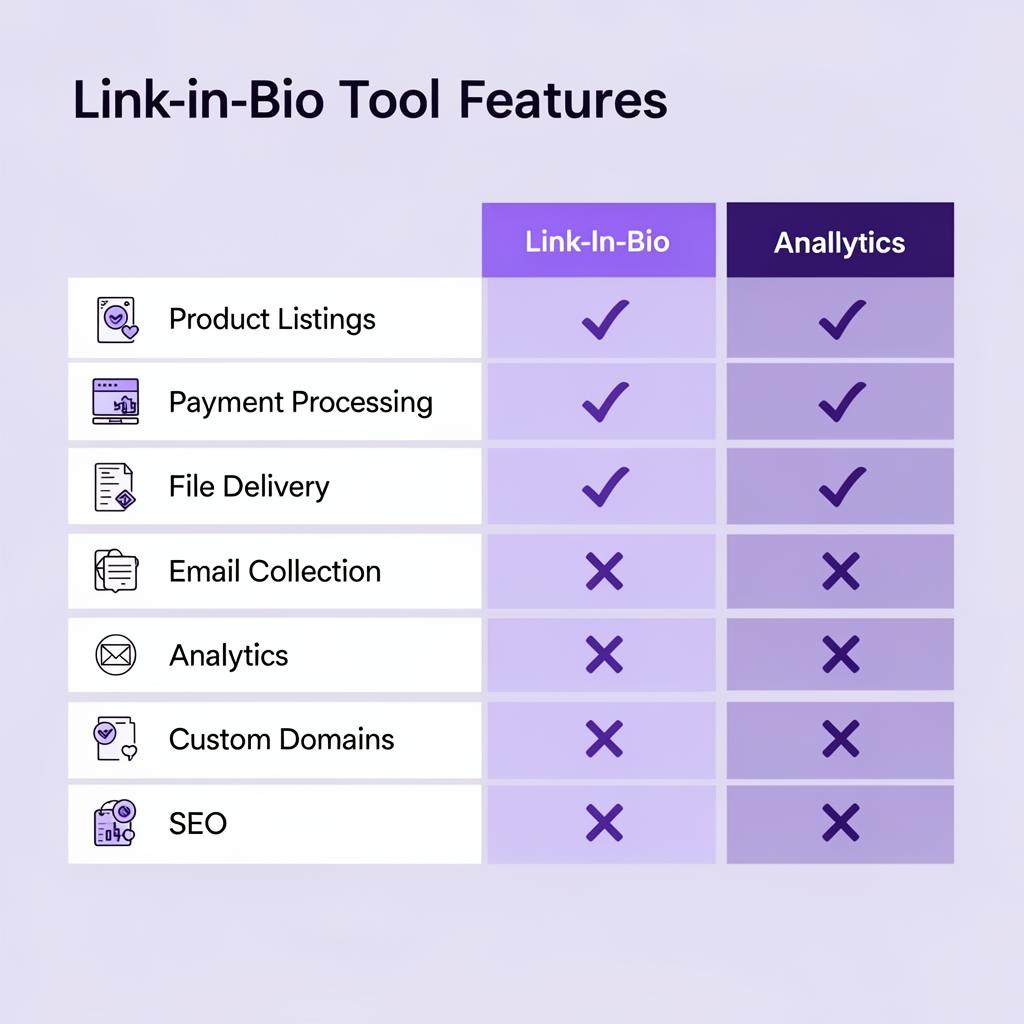
    Feature comparison infographic of link-in-bio tools showing product listings payment processing file delivery email collection analytics custom domains and SEO capabilities

    Feature-by-feature comparison: Creastor delivers a complete commerce platform where Linktree offers only basic link aggregation.

    CapabilityLinktreeCreastor
    Link aggregation
    Custom social links
    Product listings with images
    Stripe payment processing
    Digital file delivery
    Email collection at checkout
    Email marketing sequences
    Promo codes & discounts
    Order bumps (upselling)
    Sales funnels
    Course builder
    SEO-optimized pages
    Custom domain support⚠️ Paid only
    Age gate (18+ verification)
    NSFW link controls
    Revenue analytics
    Conversion tracking
    Referral tracking
    Customizable store themes⚠️ Limited Full
    0% transaction feesN/A (paid plans)

    What Makes Creastor the Best Linktree Alternative

    One Link, Full Digital Business

    Your Creastor link (creastor.com/yourname) replaces your Linktree and serves as your complete storefront. From a single bio link, your followers can:

  29. Browse your products with professional cover images and descriptions
  30. Purchase and pay securely via Stripe
  31. Receive instant file downloads — no manual delivery
  32. Join your email list automatically at checkout
  33. Access courses and exclusive content
  34. Diagram showing creator bio link flow from social media profile to product store to checkout to instant digital download

    The Creastor checkout flow: bio link → browse products → pay → instant download. No external redirects, no friction.

    Built-In Commerce Features Linktree Can't Match

    Promo codes and discounts — Create percentage-off or fixed-amount discount codes. Track usage, set expiry dates, and limit total uses. Run flash sales or reward loyal customers.

    Order bumps — When a customer is checking out, offer them a complementary product at a discounted price. This alone can increase average order value by 20–40%.

    Email marketing sequences — Automatically enroll buyers into email sequences to nurture them toward your next product. No third-party email tool needed.

    Sales funnels — Build dedicated landing pages for specific products with custom copy, social proof, and urgency elements to maximize conversions.

    Course builder — Package your knowledge into structured courses with lessons, content, and progress tracking — sell them directly from your store.

    Link Safety: Protect Your Social Accounts

    Unlike Linktree's shared domain, Creastor offers:

  35. Custom domain support — Your store lives on your own domain, completely isolated from other creators' content. No shared-domain risk.
  36. Age gate verification — Built-in 18+ age verification for adult content creators, keeping your store compliant and your social accounts safe.
  37. NSFW link controls — Mark individual custom links as NSFW with visual blur and age verification prompts before revealing the link destination.
  38. Clean metadata — Creastor generates professional, platform-safe Open Graph and meta tags that won't trigger social media content scanners.
  39. Learn how Creastor's safety features work in detail: How Creastor Protects Creators with Adult Content Links. If you're worried about shared-domain bans, read why creators on Stan Store and Beacons are getting flagged.

    SEO That Actually Ranks

    Every Creastor store page is generated with:

  40. Customizable meta titles and descriptions
  41. Open Graph and Twitter Card tags
  42. JSON-LD structured data
  43. Semantic HTML markup
  44. Fast-loading, mobile-optimized pages
  45. Proper canonical URLs
  46. This means your store can rank on Google for your name, brand, and product keywords — bringing free organic traffic that compounds over time.

    0% Platform Transaction Fees

    On paid plans, Creastor charges 0% platform transaction fees. You pay only standard Stripe processing (2.9% + 30¢). Compare that to:

  47. Gumroad: 10% on the free plan
  48. Stan Store: 5% on the Creator plan
  49. Beacons: 9% on the free plan
  50. Linktree: Doesn't even process payments
  51. Not sure how to price your products once you switch? Check out our psychology-backed pricing strategies guide.


    The Revenue Impact of Switching

    Creators who switch from Linktree to a direct-selling bio link platform typically see:

  52. 2–3x higher conversion rates — fewer clicks between follower and purchase
  53. 30% more email subscribers — captured automatically at point of sale
  54. 15–25% increase in average order value — thanks to order bumps and promo codes
  55. 50%+ increase in total revenue — less friction + more tools = more money

  56. How to Switch From Linktree in 5 Minutes

  57. Create your free Creastor store → (takes 2 minutes)
  58. Add your products — upload files, set prices, write descriptions, add cover images
  59. Customize your theme — choose colors, layout, and branding that match your style
  60. Add your social links — all the links you had on Linktree, plus custom link controls
  61. Replace your bio link — swap your Linktree URL for your Creastor URL
  62. You keep everything Linktree offered — a beautiful bio page with all your links — while gaining a full commerce platform, email marketing, analytics, and link safety underneath.


    Who Should Switch From Linktree?

  63. Creators selling digital products — ebooks, presets, templates, courses, coaching
  64. Content creators monetizing an audience — anyone with a following who wants to convert followers into customers
  65. Adult content creators — who need age gating and link safety to protect their social accounts
  66. Creators concerned about link bans — anyone who has experienced or fears Instagram/TikTok shadowbanning their bio link
  67. Creators who want to own their audience — build an email list you control, not just social followers you rent

  68. Linktree Alternatives Comparison: How Creastor Stacks Up

    FeatureLinktreeStan StoreBeaconsCreastor
    Free plan ($29/mo min)
    Payment processing
    0% transaction feesN/A (5%) (9% free) (paid plans)
    File delivery⚠️ Limited
    Email sequences⚠️ Basic
    Promo codes
    Order bumps
    Sales funnels
    Course builder
    Custom domain⚠️ Paid
    Age gate
    SEO optimization
    NSFW controls

    Want to dive deeper into specific alternatives? Read our detailed comparisons:

  69. Best Stan Store Alternative — Why creators are leaving Stan Store's $29/mo + 5% fees
  70. Best Beacons.ai Alternative — How Creastor beats Beacons' 9% fee and limited marketing tools
  71. Best Gumroad Alternative — Why paying 10% per sale in 2026 makes no sense
  72. Beacons vs Stan Store vs Creastor — The full three-way comparison
  73. Best Link in Bio Tool for Selling — How to choose the right bio link selling platform
  74. How to Protect Your Bio Link from Bans — A must-read if you've ever worried about shadowbans

  75. Stop Leaving Money on the Table

    Every day you use Linktree instead of a proper commerce platform, you're losing potential sales to unnecessary friction, missing email subscribers, and giving up SEO value that could bring free traffic for years.

    Create your free Creastor store → and start selling from your bio link in minutes — with 0% fees, instant file delivery, email marketing, and the link safety features your social accounts need.

    Frequently Asked Questions

    Can I sell products on Linktree?

    Linktree has extremely limited commerce. You cannot upload digital files, process payments directly within the page, or deliver products automatically. Linktree's Commerce Links simply redirect buyers to external payment pages like PayPal or Shopify, adding friction and losing conversions. For direct selling, you need a dedicated creator commerce platform like Creastor that handles product listings, payments, file delivery, and email capture all in one link.

    What is the best Linktree alternative for creators who sell?

    Creastor is the best Linktree alternative for creators who sell digital products. It combines a beautiful bio link page with a full digital product store, Stripe-powered payments, automatic file delivery, email subscriber collection, promo codes, order bumps, email marketing sequences, sales funnels, and detailed analytics — all from a single link. Unlike Linktree, Creastor charges 0% transaction fees on paid plans.

    Why is Linktree bad for SEO?

    Linktree pages are hosted on linktree.com, so any search authority goes to Linktree's domain, not yours. Your Linktree page has no customizable meta titles, meta descriptions, canonical URLs, or structured data. This means your Linktree cannot rank on Google for your name, brand, or products. Creastor generates SEO-optimized store pages with proper metadata, Open Graph tags, and structured data — giving your store a chance to rank organically.

    Is Linktree free in 2026?

    Linktree offers a free tier, but it's very limited — no removing Linktree branding, no advanced analytics, limited customization, and no commerce features. The paid plans start at $5/month (Starter) and go up to $24/month (Premium). Even on paid plans, Linktree's selling capabilities are minimal compared to dedicated creator commerce platforms. Creastor also offers a free tier, but includes product listings, payment processing, and file delivery at no cost.

    Can Linktree get my Instagram or TikTok banned?

    Linktree itself won't get you banned, but shared-domain link-in-bio tools carry platform risk. When other creators on the same linktree.com domain share content that violates social media guidelines, the entire domain can be flagged — affecting all users. Creastor mitigates this with custom domain support, isolating your store from other creators' content, plus built-in age gating and clean metadata to keep your social accounts safe.

    Does Linktree take a percentage of sales?

    Linktree's Commerce Links don't process payments directly — they redirect to external platforms that may charge their own fees. This means you're paying fees to both Linktree (for the plan) and the external payment processor. With Creastor, payments go through Stripe directly with 0% platform transaction fees on paid plans — you only pay standard Stripe processing fees (2.9% + 30¢).

    How do I switch from Linktree to Creastor?

    Switching takes under 5 minutes: 1) Sign up for a free Creastor account, 2) Add your digital products with descriptions and pricing, 3) Customize your store theme and branding, 4) Replace your Linktree URL with your Creastor URL in your social media bios. You keep everything Linktree offered — a beautiful bio page — while gaining a full commerce platform, email marketing, and link safety features.

    What features does Creastor have that Linktree doesn't?

    Creastor offers product listings with cover images and descriptions, Stripe payment processing, automatic digital file delivery, email subscriber collection at point of sale, email marketing sequences, promo codes and discount campaigns, order bumps for upselling, sales funnel builder, detailed revenue and conversion analytics, custom domain support for link safety, age gate verification, NSFW content controls, course builder, referral tracking, and SEO-optimized store pages — none of which are available on Linktree.

    #linktree alternative#link in bio#sell from bio#creator tools#linktree problems#linktree vs creastor#best link in bio for selling#linktree banned#linktree pricing